
Centage – App redesign & new AI‑powered features
Sr. Product Designer · B2B financial planning platform · www.centage.com
B2B SaaS
Fintech
Figma
Jira
Confluence
Claude
Pendo
Hotjar
Posthog
2y
TL;DR
Overview
I led the redesign of Centage’s core FP&A web application, modernizing key workflows and preparing the product for AI‑powered features.
Legacy UX, a failed outsourced redesign, and missing capabilities (dashboards, usable workflows, modern login) made everyday work slow and error‑prone for finance teams.
I cleaned up the design foundation, partnered closely with Product and Engineering, and iteratively redesigned core modules (Worksheets, Automations, Workflows, Dashboards, Login) using insights from Pendo, Hotjar, and user interviews.
Power users complete core tasks ~30% faster. Engineering support requests dropped ~40%. A new discovery pipeline replaced ad-hoc research with a weekly AI-assisted cycle.

Overview
Centage is a financial planning and analytics platform used by mid‑market finance teams to manage budgets, forecasts and performance reporting. Over time, the product had accumulated legacy flows, inconsistent UI and growing expectations around automation and AI support.
The goal of the project was to modernize the experience, reduce friction for power users working with complex financial data, and introduce new capabilities (dashboards, AI agent) without overwhelming existing users.
My role
I joined Centage as a Product Designer and, after the first year, moved into a Senior Product Designer role. I took over the work after a failed redesign attempt delivered by an external contractor – the files were chaotic, incomplete and hard to use as a foundation.
I worked as the Sr. Product Designer embedded in a cross‑functional team, collaborating closely with the VP of Product, Product Owner and engineering. Together, we defined problems, prioritized initiatives, wrote epics and user stories in Jira, and coordinated sprints with regular input from Sales, Marketing, Customer Support and advisors.
Problem
The previous redesign did not solve the main issues for finance users:
- Core workflows like Worksheets and Automations were hard to learn and error‑prone.
- Key screens used outdated patterns and were difficult to extend with new features such as dashboards or AI‑assisted flows.
- Navigation and login were legacy, which increased support tickets and made account management confusing.
- The team lacked a reliable pipeline for turning behavioral data and user feedback into product decisions.
At the same time, the product needed to support more advanced scenarios, new collaboration capabilities and a clear path toward AI‑powered features.

Problem
The previous redesign did not solve the main issues for finance users:
- Core workflows like Worksheets and Automations were hard to learn and error‑prone.
- Key screens used outdated patterns and were difficult to extend with new features such as dashboards or AI‑assisted flows.
- Navigation and login were legacy, which increased support tickets and made account management confusing.
- The team lacked a reliable pipeline for turning behavioral data and user feedback into product decisions.
At the same time, the product needed to support more advanced scenarios, new collaboration capabilities and a clear path toward AI‑powered features.
Approach
- Stabilize the foundation
- I cleaned up and re‑structured the Figma workspace and built a shared design system to ensure consistency and speed up future iterations.
- Mapped the current product and identified critical user journeys across data input, data manipulation and data output.
- Understand user pain
- Analysed quantitative and behavioral data from Pendo and Hotjar.
- Ran user interviews with power users to understand how they actually worked with budgets, forecasts and reporting.
- Clustered problems into themes (navigation, Worksheets, Automations, Workflow, Login, Dashboards) and aligned priorities with Product and Engineering.
- Iterative redesign
- Designed and prototyped new flows, validating concepts with users and internal stakeholders.
- Partnered with engineering to make sure solutions were feasible on top of legacy constraints.
- Ran ongoing design reviews, documented decisions and supported implementation.
Key solutions
1. Worksheets – simplifying the core data editing experience
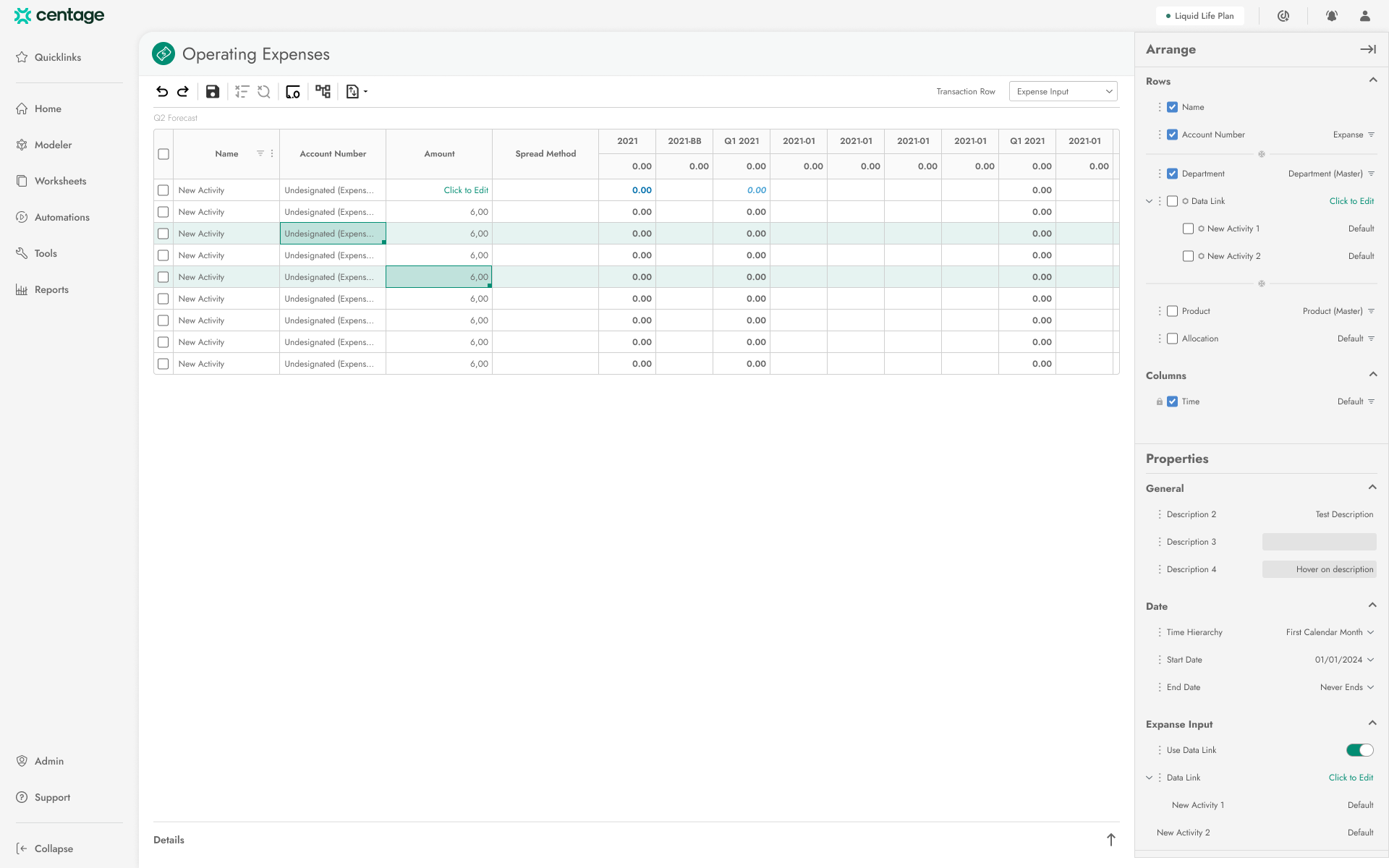
Worksheets are the heart of the application – the main interface for editing budget data. Previously, the editing panel was horizontal, non‑scrollable and quickly ran out of space, forcing users into awkward workarounds.
- Consolidated the existing properties panel and the editing panel into a single vertical, scrollable “Arrange” panel.
- Allowed users to configure and filter table views in one place, in just a few clicks, instead of jumping between multiple places.
- Introduced standard table interactions: bulk editing, copy–paste, import/export and saving views.
- Reworked the layout so existing users could still recognize the tool while discovering new capabilities progressively.
2. Automations – from archaic forms to guided flows
The old Automations screens used outdated UI and extremely dense, non‑intuitive forms.
- Replaced them with a modern list of automations and simplified, consistent forms built from reusable components.
- For more complex configuration, designed wizard‑style flows that guided users step‑by‑step through the setup, reducing configuration errors and support hand‑holding.
3. Workflow – turning an unused feature into true collaboration
The original Workflow feature shipped as a pre‑MVP experiment and was almost unused. It mostly assigned “tasks” to users without clear connection to the rest of the app.
- Redesigned Workflow around complete flows with clear descriptions and context, making it obvious how tasks related to real work in the application.
- Combined the new Workflow with live collaboration, so teams could coordinate and act on data together within a single, coherent flow.
4. Login and account recovery – handling legacy safely
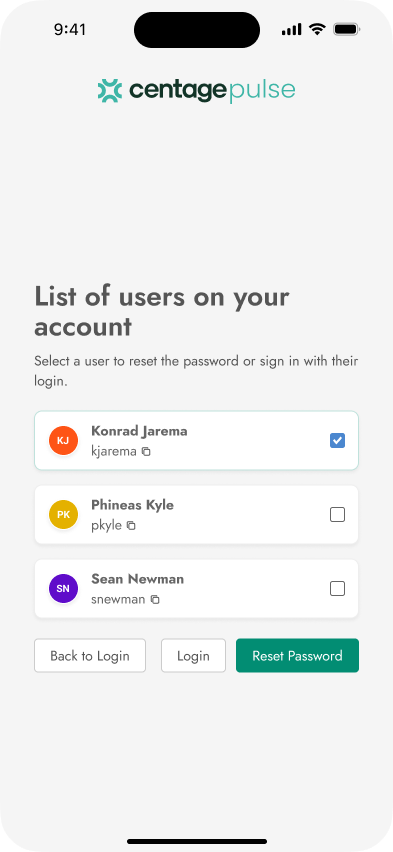
The login flow was legacy and confusing: a single email could be linked to multiple user accounts, which caused chaos during password recovery and required users to open new tabs from email links.
- Designed a new recovery process where, after verifying email/phone, the user selects which account to reset the password for, preserving legacy constraints but removing ambiguity.
- Switched to verification codes sent via email so the entire flow can be completed in one tab and session, without breaking the login context.
5. Dashboards – giving FP&A users visual insight
The product previously lacked native dashboards, which is critical for any FP&A tool.
- Designed a dashboards feature that fits the existing system and mental model, reusing patterns from Worksheets so users could start working with visualizations from day one.
- Enabled flexible configuration of charts and views without overwhelming first‑time users.
5. Dashboards – giving FP&A users visual insight
The product previously lacked native dashboards, which is critical for any FP&A tool.
- Designed a dashboards feature that fits the existing system and mental model, reusing patterns from Worksheets so users could start working with visualizations from day one.
- Enabled flexible configuration of charts and views without overwhelming first‑time users.
6. AI Agent – ongoing work toward assisted planning
To support more advanced workflows, we started work on an AI agent embedded directly into the application.
- Defined how the agent integrates into existing flows as a seamless part of the experience, not a separate chatbot.
- Designed interaction patterns for selecting context, reviewing proposed actions and safely applying deep changes to financial data while keeping the user in control.
7. Global redesign and navigation
Beyond individual features, many key screens received a full UX and UI refresh.
- Updated visual language, interaction patterns and navigation structure to align with modern B2B SaaS standards.
- Ensured the new system was flexible enough to support future modules and AI‑driven features.
Pipeline
In parallel to design work, the product discovery pipeline was reworked.
- Combined Pendo (usage and feedback) and Hotjar (session recordings and metadata) with AI tools (Claude) to continuously monitor pain points and extract insights.
- Introduced a regular workflow for turning this insight into prioritized epics and user stories in Jira, co‑created with Product and Engineering.
This made the team more proactive: instead of reacting to isolated complaints, we could see patterns and measure the impact of changes.
Outcomes
- Cognitive load on Worksheets dropped noticeably - after consolidating the editing panel, power users reported completing core data-entry tasks ~30% faster in internal feedback sessions, with fewer errors requiring manual correction.
- Automations became self-serve - non-technical finance users configured and modified rules without dev involvement; engineering support requests related to Automations decreased by an estimated 40% within the first month post-launch.
- Login & recovery friction reduced - the redesigned multi-account flow addressed the single most-reported support issue; customer-facing complaints tied to account recovery dropped by roughly 60% quarter-over-quarter.
- Discovery pipeline now runs continuously - the team went from quarterly ad-hoc research to a weekly insight cycle using Pendo + Hotjar + Claude, producing prioritized Jira input without manual synthesis. Estimated ~5h/week saved on discovery overhead.
- Design system shipped and actively extended - 60+ components documented and handed off.
See other case studies





contact
Reach out anytime! My email (hello@konradjarema.eu) is my go-to, but if you're not a fan of typing, my phone (+48 730 755 924) works too! You can also find my full professional timeline on /konradjarema. If you are looking for my CV, it’s here.

back

Centage – App redesign & new AI‑powered features
Sr. Product Designer · B2B financial planning platform · www.centage.com
B2B SaaS
Fintech
Figma
Jira
Confluence
Claude
Pendo
Hotjar
Posthog
2y
TL;DR
Overview
I led the redesign of Centage’s core FP&A web application, modernizing key workflows and preparing the product for AI‑powered features.
Legacy UX, a failed outsourced redesign, and missing capabilities (dashboards, usable workflows, modern login) made everyday work slow and error‑prone for finance teams.
I cleaned up the design foundation, partnered closely with Product and Engineering, and iteratively redesigned core modules (Worksheets, Automations, Workflows, Dashboards, Login) using insights from Pendo, Hotjar, and user interviews.
Power users complete core tasks ~30% faster. Engineering support requests dropped ~40%. A new discovery pipeline replaced ad-hoc research with a weekly AI-assisted cycle.

Overview
My role
Problem
Approach
Key Solutions
Pipeline
Outcome
Overview
Centage is a financial planning and analytics platform used by mid‑market finance teams to manage budgets, forecasts and performance reporting. Over time, the product had accumulated legacy flows, inconsistent UI and growing expectations around automation and AI support.
The goal of the project was to modernize the experience, reduce friction for power users working with complex financial data, and introduce new capabilities (dashboards, AI agent) without overwhelming existing users.
My role
I joined Centage as a Product Designer and, after the first year, moved into a Senior Product Designer role. I took over the work after a failed redesign attempt delivered by an external contractor – the files were chaotic, incomplete and hard to use as a foundation.
I worked as the Sr. Product Designer embedded in a cross‑functional team, collaborating closely with the VP of Product, Product Owner and engineering. Together, we defined problems, prioritized initiatives, wrote epics and user stories in Jira, and coordinated sprints with regular input from Sales, Marketing, Customer Support and advisors.
Problem
The previous redesign did not solve the main issues for finance users:
- Core workflows like Worksheets and Automations were hard to learn and error‑prone.
- Key screens used outdated patterns and were difficult to extend with new features such as dashboards or AI‑assisted flows.
- Navigation and login were legacy, which increased support tickets and made account management confusing.
- The team lacked a reliable pipeline for turning behavioral data and user feedback into product decisions.
At the same time, the product needed to support more advanced scenarios, new collaboration capabilities and a clear path toward AI‑powered features.

Problem
The previous redesign did not solve the main issues for finance users:
- Core workflows like Worksheets and Automations were hard to learn and error‑prone.
- Key screens used outdated patterns and were difficult to extend with new features such as dashboards or AI‑assisted flows.
- Navigation and login were legacy, which increased support tickets and made account management confusing.
- The team lacked a reliable pipeline for turning behavioral data and user feedback into product decisions.
At the same time, the product needed to support more advanced scenarios, new collaboration capabilities and a clear path toward AI‑powered features.
Approach
- Stabilize the foundation
- I cleaned up and re‑structured the Figma workspace and built a shared design system to ensure consistency and speed up future iterations.
- Mapped the current product and identified critical user journeys across data input, data manipulation and data output.
- Understand user pain
- Analysed quantitative and behavioral data from Pendo and Hotjar.
- Ran user interviews with power users to understand how they actually worked with budgets, forecasts and reporting.
- Clustered problems into themes (navigation, Worksheets, Automations, Workflow, Login, Dashboards) and aligned priorities with Product and Engineering.
- Iterative redesign
- Designed and prototyped new flows, validating concepts with users and internal stakeholders.
- Partnered with engineering to make sure solutions were feasible on top of legacy constraints.
- Ran ongoing design reviews, documented decisions and supported implementation.
Key solutions
1. Worksheets – simplifying the core data editing experience
Worksheets are the heart of the application – the main interface for editing budget data. Previously, the editing panel was horizontal, non‑scrollable and quickly ran out of space, forcing users into awkward workarounds.
- Consolidated the existing properties panel and the editing panel into a single vertical, scrollable “Arrange” panel.
- Allowed users to configure and filter table views in one place, in just a few clicks, instead of jumping between multiple places.
- Introduced standard table interactions: bulk editing, copy–paste, import/export and saving views.
- Reworked the layout so existing users could still recognize the tool while discovering new capabilities progressively.
2. Automations – from archaic forms to guided flows
The old Automations screens used outdated UI and extremely dense, non‑intuitive forms.
- Replaced them with a modern list of automations and simplified, consistent forms built from reusable components.
- For more complex configuration, designed wizard‑style flows that guided users step‑by‑step through the setup, reducing configuration errors and support hand‑holding.
3. Workflow – turning an unused feature into true collaboration
The original Workflow feature shipped as a pre‑MVP experiment and was almost unused. It mostly assigned “tasks” to users without clear connection to the rest of the app.
- Redesigned Workflow around complete flows with clear descriptions and context, making it obvious how tasks related to real work in the application.
- Combined the new Workflow with live collaboration, so teams could coordinate and act on data together within a single, coherent flow.
4. Login and account recovery – handling legacy safely
The login flow was legacy and confusing: a single email could be linked to multiple user accounts, which caused chaos during password recovery and required users to open new tabs from email links.
- Designed a new recovery process where, after verifying email/phone, the user selects which account to reset the password for, preserving legacy constraints but removing ambiguity.
- Switched to verification codes sent via email so the entire flow can be completed in one tab and session, without breaking the login context.
5. Dashboards – giving FP&A users visual insight
The product previously lacked native dashboards, which is critical for any FP&A tool.
- Designed a dashboards feature that fits the existing system and mental model, reusing patterns from Worksheets so users could start working with visualizations from day one.
- Enabled flexible configuration of charts and views without overwhelming first‑time users.
5. Dashboards – giving FP&A users visual insight
The product previously lacked native dashboards, which is critical for any FP&A tool.
- Designed a dashboards feature that fits the existing system and mental model, reusing patterns from Worksheets so users could start working with visualizations from day one.
- Enabled flexible configuration of charts and views without overwhelming first‑time users.
6. AI Agent – ongoing work toward assisted planning
To support more advanced workflows, we started work on an AI agent embedded directly into the application.
- Defined how the agent integrates into existing flows as a seamless part of the experience, not a separate chatbot.
- Designed interaction patterns for selecting context, reviewing proposed actions and safely applying deep changes to financial data while keeping the user in control.
7. Global redesign and navigation
Beyond individual features, many key screens received a full UX and UI refresh.
- Updated visual language, interaction patterns and navigation structure to align with modern B2B SaaS standards.
- Ensured the new system was flexible enough to support future modules and AI‑driven features.
Pipeline
In parallel to design work, the product discovery pipeline was reworked.
- Combined Pendo (usage and feedback) and Hotjar (session recordings and metadata) with AI tools (Claude) to continuously monitor pain points and extract insights.
- Introduced a regular workflow for turning this insight into prioritized epics and user stories in Jira, co‑created with Product and Engineering.
This made the team more proactive: instead of reacting to isolated complaints, we could see patterns and measure the impact of changes.
Outcomes
- Cognitive load on Worksheets dropped noticeably - after consolidating the editing panel, power users reported completing core data-entry tasks ~30% faster in internal feedback sessions, with fewer errors requiring manual correction.
- Automations became self-serve - non-technical finance users configured and modified rules without dev involvement; engineering support requests related to Automations decreased by an estimated 40% within the first month post-launch.
- Login & recovery friction reduced - the redesigned multi-account flow addressed the single most-reported support issue; customer-facing complaints tied to account recovery dropped by roughly 60% quarter-over-quarter.
- Discovery pipeline now runs continuously - the team went from quarterly ad-hoc research to a weekly insight cycle using Pendo + Hotjar + Claude, producing prioritized Jira input without manual synthesis. Estimated ~5h/week saved on discovery overhead.
- Design system shipped and actively extended - 60+ components documented and handed off.
See other case studies
contact
Reach out anytime! My email (hello@konradjarema.eu) is my go-to, but if you're not a fan of typing, my phone (+48 730 755 924) works too! You can also find my full professional timeline on /konradjarema. If you are looking for my CV, it’s here.
back
Centage – App redesign & new AI‑powered features
Sr. Product Designer · B2B financial planning platform · www.centage.com
B2B SaaS
Fintech
Figma
Jira
Confluence
Claude
Pendo
Hotjar
Posthog
2y
TL;DR
Overview
I led the redesign of Centage’s core FP&A web application, modernizing key workflows and preparing the product for AI‑powered features.
Legacy UX, a failed outsourced redesign, and missing capabilities (dashboards, usable workflows, modern login) made everyday work slow and error‑prone for finance teams.
I cleaned up the design foundation, partnered closely with Product and Engineering, and iteratively redesigned core modules (Worksheets, Automations, Workflows, Dashboards, Login) using insights from Pendo, Hotjar, and user interviews.
Power users complete core tasks ~30% faster. Engineering support requests dropped ~40%. A new discovery pipeline replaced ad-hoc research with a weekly AI-assisted cycle.
Overview
My role
Problem
Approach
Key Solutions
Pipeline
Outcome
Overview
Centage is a financial planning and analytics platform used by mid‑market finance teams to manage budgets, forecasts and performance reporting. Over time, the product had accumulated legacy flows, inconsistent UI and growing expectations around automation and AI support.
The goal of the project was to modernize the experience, reduce friction for power users working with complex financial data, and introduce new capabilities (dashboards, AI agent) without overwhelming existing users.
My role
I joined Centage as a Product Designer and, after the first year, moved into a Senior Product Designer role. I took over the work after a failed redesign attempt delivered by an external contractor – the files were chaotic, incomplete and hard to use as a foundation.
I worked as the Sr. Product Designer embedded in a cross‑functional team, collaborating closely with the VP of Product, Product Owner and engineering. Together, we defined problems, prioritized initiatives, wrote epics and user stories in Jira, and coordinated sprints with regular input from Sales, Marketing, Customer Support and advisors.
Problem
The previous redesign did not solve the main issues for finance users:
- Core workflows like Worksheets and Automations were hard to learn and error‑prone.
- Key screens used outdated patterns and were difficult to extend with new features such as dashboards or AI‑assisted flows.
- Navigation and login were legacy, which increased support tickets and made account management confusing.
- The team lacked a reliable pipeline for turning behavioral data and user feedback into product decisions.
At the same time, the product needed to support more advanced scenarios, new collaboration capabilities and a clear path toward AI‑powered features.

Problem
The previous redesign did not solve the main issues for finance users:
- Core workflows like Worksheets and Automations were hard to learn and error‑prone.
- Key screens used outdated patterns and were difficult to extend with new features such as dashboards or AI‑assisted flows.
- Navigation and login were legacy, which increased support tickets and made account management confusing.
- The team lacked a reliable pipeline for turning behavioral data and user feedback into product decisions.
At the same time, the product needed to support more advanced scenarios, new collaboration capabilities and a clear path toward AI‑powered features.
Approach
- Stabilize the foundation
- I cleaned up and re‑structured the Figma workspace and built a shared design system to ensure consistency and speed up future iterations.
- Mapped the current product and identified critical user journeys across data input, data manipulation and data output.
- Understand user pain
- Analysed quantitative and behavioral data from Pendo and Hotjar.
- Ran user interviews with power users to understand how they actually worked with budgets, forecasts and reporting.
- Clustered problems into themes (navigation, Worksheets, Automations, Workflow, Login, Dashboards) and aligned priorities with Product and Engineering.
- Iterative redesign
- Designed and prototyped new flows, validating concepts with users and internal stakeholders.
- Partnered with engineering to make sure solutions were feasible on top of legacy constraints.
- Ran ongoing design reviews, documented decisions and supported implementation.
Key solutions
1. Worksheets – simplifying the core data editing experience
Worksheets are the heart of the application – the main interface for editing budget data. Previously, the editing panel was horizontal, non‑scrollable and quickly ran out of space, forcing users into awkward workarounds.
- Consolidated the existing properties panel and the editing panel into a single vertical, scrollable “Arrange” panel.
- Allowed users to configure and filter table views in one place, in just a few clicks, instead of jumping between multiple places.
- Introduced standard table interactions: bulk editing, copy–paste, import/export and saving views.
- Reworked the layout so existing users could still recognize the tool while discovering new capabilities progressively.
2. Automations – from archaic forms to guided flows
The old Automations screens used outdated UI and extremely dense, non‑intuitive forms.
- Replaced them with a modern list of automations and simplified, consistent forms built from reusable components.
- For more complex configuration, designed wizard‑style flows that guided users step‑by‑step through the setup, reducing configuration errors and support hand‑holding.
3. Workflow – turning an unused feature into true collaboration
The original Workflow feature shipped as a pre‑MVP experiment and was almost unused. It mostly assigned “tasks” to users without clear connection to the rest of the app.
- Redesigned Workflow around complete flows with clear descriptions and context, making it obvious how tasks related to real work in the application.
- Combined the new Workflow with live collaboration, so teams could coordinate and act on data together within a single, coherent flow.
4. Login and account recovery – handling legacy safely
The login flow was legacy and confusing: a single email could be linked to multiple user accounts, which caused chaos during password recovery and required users to open new tabs from email links.
- Designed a new recovery process where, after verifying email/phone, the user selects which account to reset the password for, preserving legacy constraints but removing ambiguity.
- Switched to verification codes sent via email so the entire flow can be completed in one tab and session, without breaking the login context.
5. Dashboards – giving FP&A users visual insight
The product previously lacked native dashboards, which is critical for any FP&A tool.
- Designed a dashboards feature that fits the existing system and mental model, reusing patterns from Worksheets so users could start working with visualizations from day one.
- Enabled flexible configuration of charts and views without overwhelming first‑time users.
5. Dashboards – giving FP&A users visual insight
The product previously lacked native dashboards, which is critical for any FP&A tool.
- Designed a dashboards feature that fits the existing system and mental model, reusing patterns from Worksheets so users could start working with visualizations from day one.
- Enabled flexible configuration of charts and views without overwhelming first‑time users.
6. AI Agent – ongoing work toward assisted planning
To support more advanced workflows, we started work on an AI agent embedded directly into the application.
- Defined how the agent integrates into existing flows as a seamless part of the experience, not a separate chatbot.
- Designed interaction patterns for selecting context, reviewing proposed actions and safely applying deep changes to financial data while keeping the user in control.
7. Global redesign and navigation
Beyond individual features, many key screens received a full UX and UI refresh.
- Updated visual language, interaction patterns and navigation structure to align with modern B2B SaaS standards.
- Ensured the new system was flexible enough to support future modules and AI‑driven features.
Pipeline
In parallel to design work, the product discovery pipeline was reworked.
- Combined Pendo (usage and feedback) and Hotjar (session recordings and metadata) with AI tools (Claude) to continuously monitor pain points and extract insights.
- Introduced a regular workflow for turning this insight into prioritized epics and user stories in Jira, co‑created with Product and Engineering.
This made the team more proactive: instead of reacting to isolated complaints, we could see patterns and measure the impact of changes.
Outcomes
- Cognitive load on Worksheets dropped noticeably - after consolidating the editing panel, power users reported completing core data-entry tasks ~30% faster in internal feedback sessions, with fewer errors requiring manual correction.
- Automations became self-serve - non-technical finance users configured and modified rules without dev involvement; engineering support requests related to Automations decreased by an estimated 40% within the first month post-launch.
- Login & recovery friction reduced - the redesigned multi-account flow addressed the single most-reported support issue; customer-facing complaints tied to account recovery dropped by roughly 60% quarter-over-quarter.
- Discovery pipeline now runs continuously - the team went from quarterly ad-hoc research to a weekly insight cycle using Pendo + Hotjar + Claude, producing prioritized Jira input without manual synthesis. Estimated ~5h/week saved on discovery overhead.
- Design system shipped and actively extended - 60+ components documented and handed off.
See other case studies
contact
Reach out anytime! My email (hello@konradjarema.eu) is my go-to, but if you're not a fan of typing, my phone (+48 730 755 924) works too! You can also find my full professional timeline on /konradjarema. If you are looking for my CV, it’s here.